Connecting AI to Halo
- openai
- Azure OpenAI
- AI connection
- default AI connection
- Azure openai connection
- OpenAI connection
- built in halo connection
- amazon bedrock
In this guide we will cover:
- How to connect AI to your Halo instance
- AI Functionalities
Before AI can be leveraged in your Halo instance you will first need to set up an AI connection. In this guide we will run through how to connect your Halo to various AI models.
For the security implications associated with each model checkout Halo AI - Security Implications.
How to connect AI to your Halo instance
Navigate to configuration > AI > General Settings. Under the 'setup' section of this page you can choose which AI connection to use.
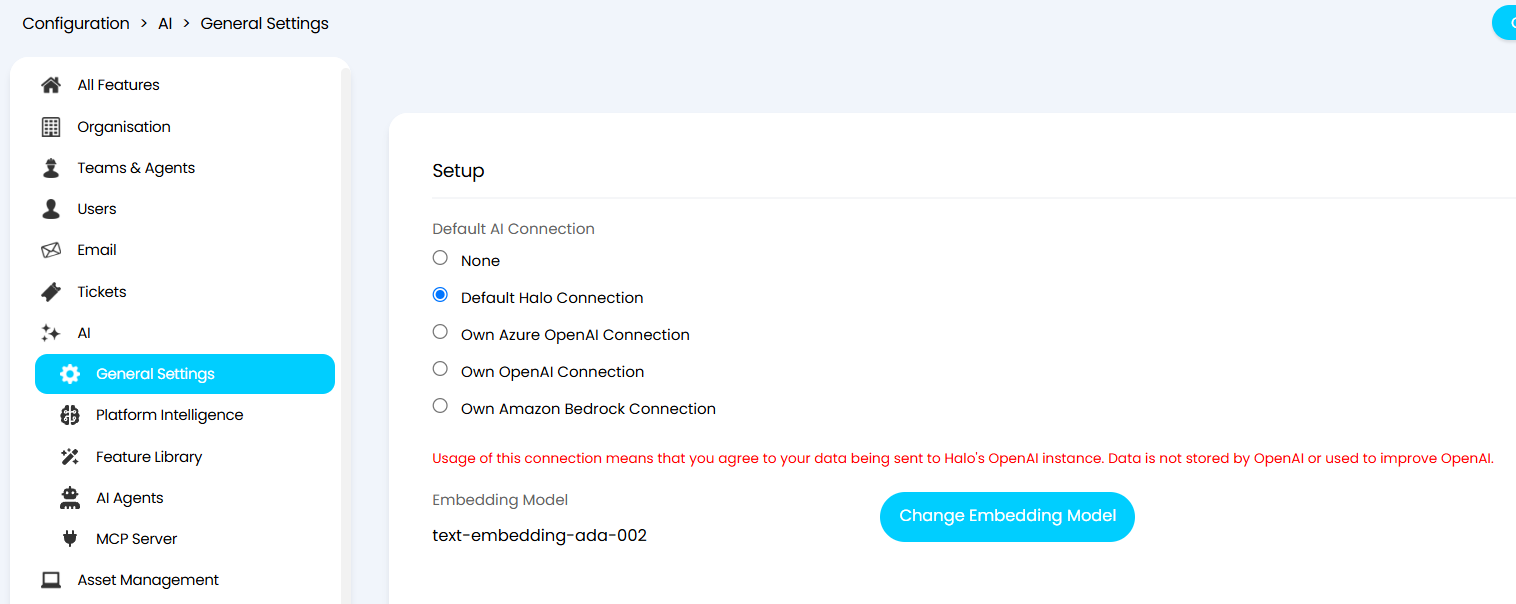
Fig 1. Default AI connection
There are multiple options for the default AI connection for your Halo instance. In this guide we will run through the available options and the implications for choosing each respective option.
Default Halo Connection
Halo leverages the OpenAI API for the default connection covered under an enterprise agreement with OpenAI. No credentials or configuration are required to enable this connection type; it is pre-configured out of the box. When using this method you agree to your data being sent to Halo's OpenAI instance. Data is not stored by OpenAI or used to improve OpenAI.
Note: On versions prior to 2.244, the 4o-mini model will be used. On versions v2.244+ the gpt-5.4-nano model will be used.
How is data handled when the Default Halo Connection?
API Connection: The Halo system connects to Halo's OpenAI integration via an API. Data is sent over this connection for processing.
Encryption: Data is transmitted over secure connections using encryption protocols TLS 1.3 (1.2 fallback) to ensure data privacy and security during transmission.
Vectorisation: The data sent to OpenAI is used for vectorization (embeddings), a process that converts text into numerical vectors for machine learning purposes. The data sent to OpenAI is used for vectorisation and generating novel output. Vectorisation is a process that converts text into numerical vectors for machine learning purposes. Generative capabilities takes input data and defined prompts for a specific purpose and returns novel output that is integrated into the platform.
Data Storage:
Temporary vs. Permanent Storage - Depending on the service's architecture and policies, data might be stored temporarily during processing. There is no permanent storage of data unless specified as part of the service agreement.
Data Retention Policies -The processing of data required between Halo and the underlying OpenAI service is done in accordance with a Zero Data Retention Enterprise agreement between Halo and OpenAI, governing how data is stored for processing, Further information on OpenAI’s Zero Data Retention policies can be located here.
For interactions involving Conversation Agents, data is retained until the chat session is completed, after which Halo will remove the temporarily stored data. As with the rest of OpenAI’s platform, data and files passed to the OpenAI API are never used to train OpenAI’s models.
Security and Compliance: Enabling this connection enables Halo’s OpenAI to become a sub processor of the data. Any resulting output of any AI functionality remains siloed in your tenant’s Halo’s database that follows our standard Data Protection Agreement. You can view our GDPR statement here and your account manager can provide a copy of the data protection agreement.
Access to Data: Access to data is restricted to authorised personnel only, which might include system administrators or specific employees within Halo with a need-to-know basis.
- Customer Control: Customer have control over their data and can request deletion of permanent data stored in their instance at any time.
- Data Privacy Compliance: Halo complies with relevant regional data protection regulations (GDPR, CCPA, HIPPA) to ensure user privacy and data security.
Embedding Model
When using the Default Halo Connection, the text-embedding-ada-002 embedding model will be used to generate embeddings.
For information on what embeddings are, and when they are used, checkout the "Embeddings" section of our guide here.
Embeddings are used for the majority of Halo's AI built-in functionality, but not all. Whether embeddings are used for the functionality you are setting up can be found in the relevant setup guide for that AI feature.
Note: When using your own connection you can choose which embedding model to use.
Advantages
• Pre-configured connection (no authorisation required)
• Free to use
Disadvantages
- Custom Integration Methods pointing directly to an AI Model will not be able to use the default Halo Connection. If any AI process in your system (that is executed by a runbook) is currently using Custom Integration Methods, you will need to switch the runbooks to use AI Agents or Abilities to be able to use the default Halo connection.
Azure OpenAI Connection
When this option is selected the Azure OpenAI model will be used. You will need to configure your own connection to AzureOpenAI to use this.
Hit the 'Configure Azure OpenAI connection' button after 'Own Azure OpenAI Connection' is selected as the connection method to enter your connection details.
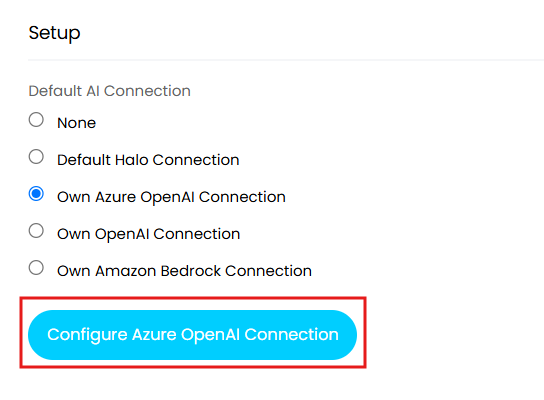
Fig 2. Configure Azure OpenAI Connection
Setting up a connection to your own Azure OpenAI account will require an endpoint URL, API key, API version, a Azure OpenAI Deployment, and an Azure OpenAI Embeddings Deployment, as shown in figure 3.
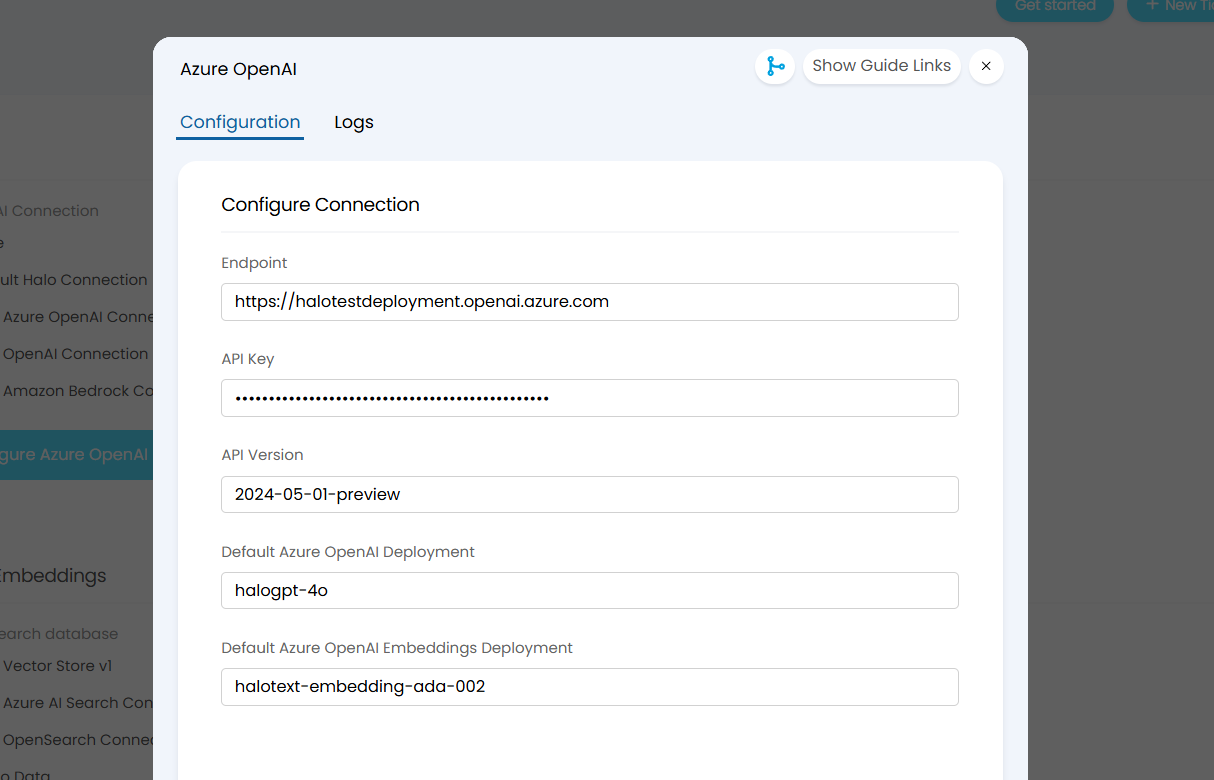
Fig 3. Azure OpenAI connection details
Advantages
- All AI functionality can be used with this method.
- Note: AI search functionalities will require an additional vector search database to be connected. However, Halo supports the use of an Azure AI Search database.
Disadvantages
- Tokens will need to be purchased to use Azure OpenAI, pricing depends on the models you choose.
- Requires an Azure subscription.
A list of available models and their pricing per million tokens can be found here.
Regional availability of models can be found here.
Connecting
To obtain the connection details required to connect to your Azure OpenAI see our dedicated guide here.
Two deployments will be required to setup this connection type:
• One for embeddings (e.g., text-embedding-ada-002).
• One for your OpenAI model (e.g., gpt-3.5-turbo or gpt-4).
Own OpenAI connection
When this option is selected the OpenAI model will be used. You will need to configure the connection to OpenAI to use this. Note that free versions of OpenAI are limited in the connection they provide, although can be used for testing. If you are looking to use the OpenAI connection long term, then a paid account will be required.
A list of available models and their pricing per million tokens can be found here.
For details on how to connect using this model see our guide on the OpenAI Integration.
Advantages
- Does not require an Azure subscription.
- Free version of OpenAI can be connected (although this is not recommended for long term use).
- All AI functionality is available with this connection type
- Note: AI search functionalities will require an additional vector search database to be connected.
Disadvantages
- Pricing will depend on the model you choose.
Own Amazon Bedrock Connection (v2.244+)
When this option is selected the Amazon Bedrock model will be used. You will need to configure the connection to Amazon Bedrock to use this.
A list of available models and their pricing per million tokens can be found here.
For details on how to connect using this model see our guide on the Amazon Bedrock Integration.
Advantages:
- Long term, this integration will support a wider use of models that are available through Bedrock.
Disadvantages:
- A paid-for Amazon Bedrock model will need to be used. Pricing will depend on the model you choose.
- Currently not all AI functionality is available with this connection type (Not available for AI Agents, external MCP servers, and runbook-based functionality).
AI Functionalities
Once you have connected you can begin configuring AI functionality for your Halo. We have various guides on how to use and set up each functionality:
Referenced by
- Advanced AI Project task Creation
- AI Ability Use Case: AI Suggested Resolution
- AI Ability Use Case: Smart Handover Review
- AI Article Creation
- Basic AI Project Task Creation
- Halo MCP Server Connection
- Leveraging AI in Halo
- MCP Endpoint: Use the Chatbot to Query and Update Data in your Instance
- Process Agent Use Case: 1st Line Support Agent
- Process Agent Use Case: Major Incident Detection
- Use AI to Analyse Business Performance
- Using the Halo MCP AI Agent With The ChatBot (Pre-Configured Environments)