Service Search - Order Service Search by Relevance
- search
- Service
- Relevance
- Weighting
A new setting can be found in Configuration > Self Service Portal;

Assume the following scenario for Service Search Type from Configuration > Services;
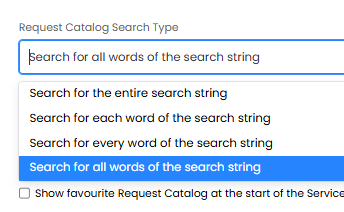
Searching for a Service;
Service Title (Agent Facing Title)
Service Portal Title (User Facing Title)
Service Tags
Service Summary
Service Request Form Name(s)
Service Description
Searching for a Service Request Form;
Service Request Form Name
Service Title (Agent Facing Title)
Service Portal Title (User Facing Title)
Service Tags
Service Summary
Relevance scoring;
For a Service:
- stdesc: 20 (service name)
- stdisplayname: 20 (service portal name)
- tags: 10 (tags)
- stsummary: 5 (summary)
- stServiceDetailsHTML: 1 (description)
- 10 * number of the service's individual request forms the search also returns.
For a Service Request Form:
- srdservicerequestlbl: 20 (form name)
- stdesc: 20 (service name)
- stdisplayname: 20 (service portal name)
- tags: 10 (tags)
- stsummary: 5 (summary)
Note; no points are awarded to the service request form for matches in the service description.