Example of how to implement Request Signing for Integration Runbook Authentication
- Runbooks
- signature validation
- secret key
- example code
- validate signature using key
This article gives example code for how to implement http request signing for the "Validate Signature using Secret Key" authentication method in Integration Runbooks.
This involves your application and Halo sharing a "Secret Key". Your application will sign all requests that are sent to the runbook start URL using this secret key. Halo will verify the signature on each request using the same secret key and reject it if the signature is not valid or if the payload does not match the original payload that the signature is for.
The example is using C# in .Net 8. By replicating similar logic you can do this in other programming languages.
In your Integration Runbook, set "Runbook Start Access" to "Can be started from Halo and from a public endpoint". Set "Authentication" to "Validate Signature using Secret Key".
Generate a new random secret key - ensure this is at least 32 characters for optimal security. For simplicity, in this example our Secret Key is "abcdefg".
Populate the form as follows;
1. Set Secret Key to your secret key you generated. In this case "abcdefg".
2. Set Signature header name to "x-halo-signature". This can have any name but this is the name we've chosen for this example.
3. Signature prefix to "sha256=".
4. Signing Algorithm to "SHA-256".
5. Digest to "Base64".
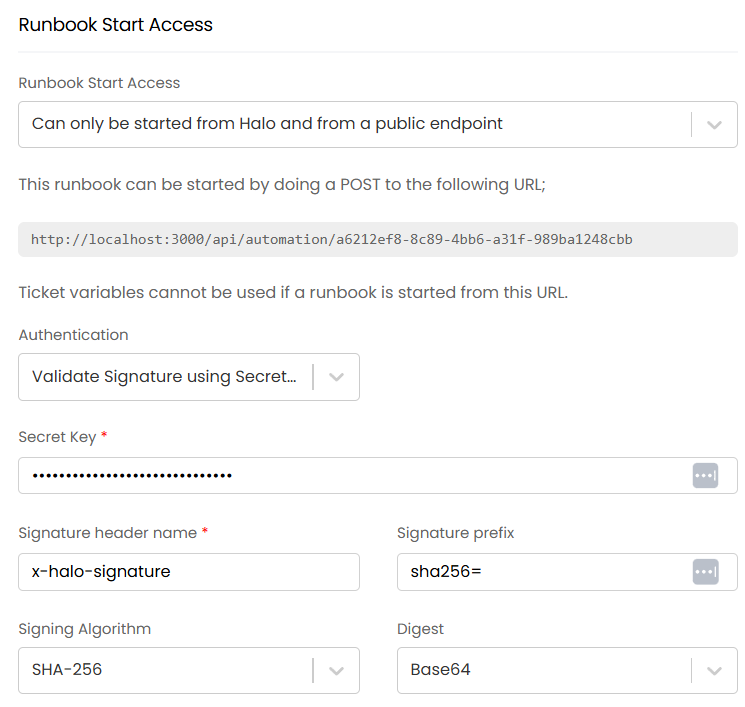
Remember to store your secret securely.
The following example code shows how to start this runbook and pass the Authentication.
If successfully validated this is recorded in the log. If validation is unsuccessful the request is not recorded and a 401 Unauthorized response is returned.
public async Task StartHaloRunbook()
{
    using (var client = new HttpClient())
    {
        try
        {
            string secretKey = "abcdefg"; // This is the secret key you add to the Integration Runbook record. ENSURE YOU STORE THIS SECURELY.
            string signatureHeader = "x-halo-signature"; // This is the signature header you add to the Integration Runbook record.
            string url = "http://localhost:3000/api/automation/a6212ef8-8c89-4bb6-a31f-989ba1248cbb"; // Set this to the runbook URL you are given on the Integration Runbook config screen.

            string jsonPayload = "{\"value\": \"test\"}"; // Your payload.

            var date = DateTimeOffset.UtcNow.ToString("r", CultureInfo.InvariantCulture);
            client.DefaultRequestHeaders.Add("x-halo-date", date);
            client.DefaultRequestHeaders.Add("x-halo-signature-algorithm", "rsa-sha256");

            var encoding = new UTF8Encoding();
            byte[] webhookKeyBytes = encoding.GetBytes(secretKey);
            byte[] payloadStringBytes = encoding.GetBytes(jsonPayload);

            using (var hmac = new HMACSHA256(webhookKeyBytes))
            {
                byte[] hashMessage = hmac.ComputeHash(payloadStringBytes);
                client.DefaultRequestHeaders.Add(signatureHeader, Convert.ToBase64String(hashMessage));
            }

            var body = new StringContent(jsonPayload, Encoding.UTF8, "application/json");
            var response = await client.PostAsync(url, body);

            // Handle the response
        }
        catch (Exception e)
        {
            // Handle the error.
        }
    }
}