Agentic AI
In this guide we will cover:
- What is Agentic AI?
- Halo's Agentic Building Blocks
- How Halo Facilitates Agentic AI
- Agentic Architecture Patterns
- Design Considerations
Related Guides:
- Conversational Agents
- Custom Integrations/Runbooks
- Halo MCP Server Connection
- Connecting AI to Halo
- Halo AI – Security Implications
What is Agentic AI?
When we talk about Agentic AI in Halo, we're referring to systems that can make decisions and take action in a structured, iterative way. At a high level, Agentic systems are able to:
- Plan the steps needed to achieve a goal
- Use tools or APIs to carry out those steps
- Observe the results of each action
- Choose what to do next based on those results
In practical terms, this means the AI can:
- Understand user input or system events
- Select relevant Halo tools (Ticketing, Runbooks, knowledge search, etc.)
- Execute those tools
- Interpret the output
- Continue until the goal is reached
Agentic behaviour emerges from the interaction between conversational reasoning, procedural automation, and tool invocation.
This guide focuses on how the components fit together to support Agentic workflows. Each component—Virtual Agents, Runbooks, and MCP—has its own dedicated configuration guide.
Halo's Agentic Building Blocks
Halo provides four core components that can be combined to create systems with agency.
Virtual Agents — Conversational reasoning
Virtual Agents interpret natural language, identify user intent, and decide which tools to call. They are central to chat-based workflows.
Runbooks — Procedural reasoning and data-centric actions
Runbooks offer structured, multi-step logic: conditions, loops, SQL queries, report access, custom API calls, and LLM-based evaluation. They are well-suited for data-driven or multi-stage workflows.
MCP Server — Tool layer for any agent
The Model Context Protocol (MCP) exposes Halo tools to external or internal agents. External LLM systems or internal Runbooks can dynamically call the same toolset.
Halo Runbooks → MCP — Internal autonomous agent
Runbooks can call Halo's MCP endpoint directly. This supports the following closed-loop autonomy:
- A Runbook gathers data
- An LLM evaluates that data
- The Runbook calls MCP tools to take action
- The loop continues until complete
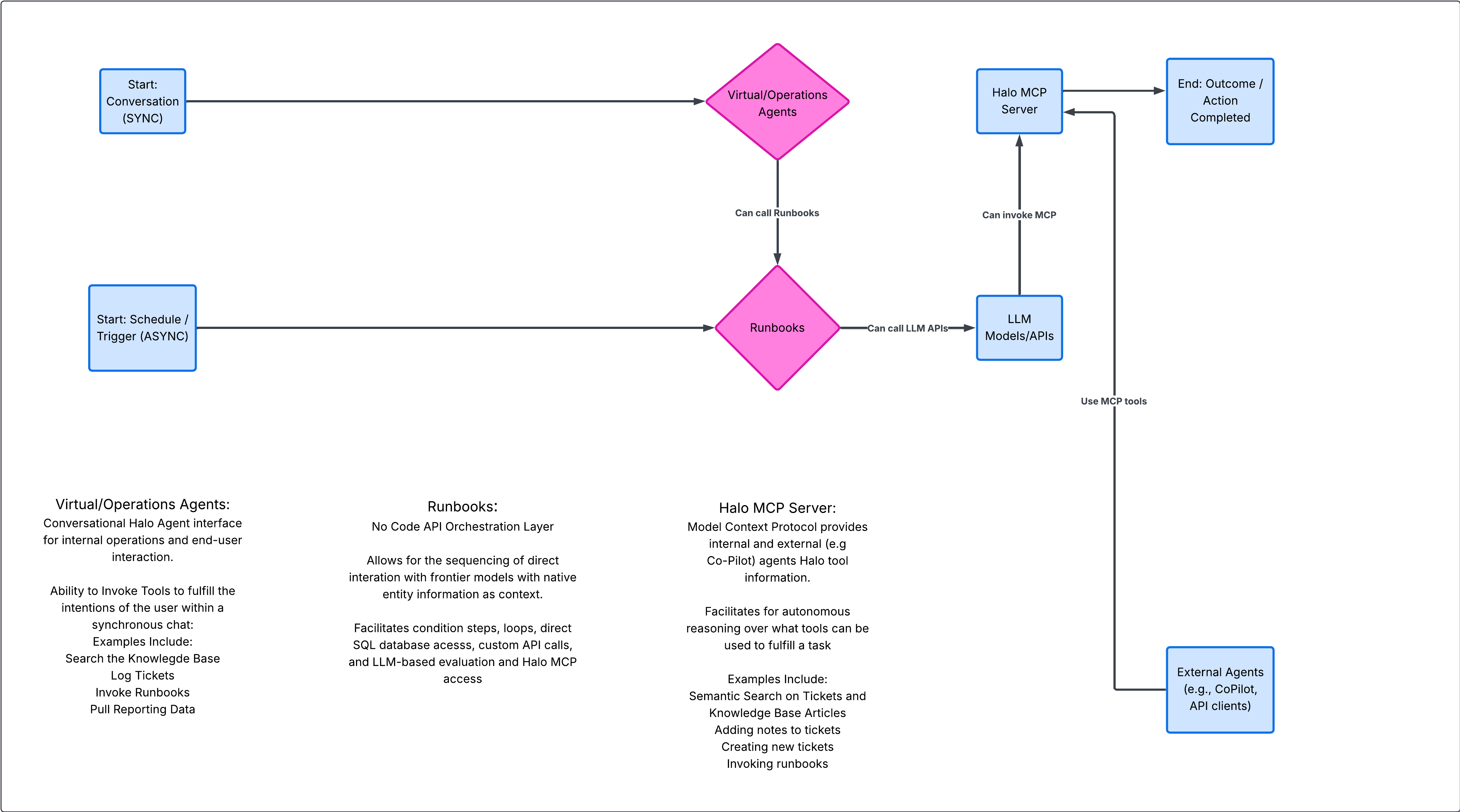
Fig 1. Agentic Workflow
Full circle — VA → Runbook → MCP → Runbook
Working together, these components support end-to-end agentic workflows:
- The Virtual Agent handles conversation and intent
- The Runbook handles structured reasoning
- MCP provides the tool execution layer
- Runbooks can continue autonomously after initial input
How Halo Facilitates Agentic AI
Agentic behaviour in Halo arises from the interaction of inputs, prompts, tools, and adaptive feedback.
Agentic workflows can begin through several entry points:
- Conversations handled by Virtual Agents
- Runbook triggers such as events, workflow actions, or schedules
- External systems calling tools via MCP
- Internal loops where a Runbook calls MCP and continues execution
Prompts define the reasoning context at each stage:
- Virtual Agent instructions describe the agent's behaviour and goals
- Chat step instructions allow stage-based reasoning (e.g., classify, decide, route)
- Runbook prompts help the LLM evaluate structured data and decide on actions
- MCP agents use prompts outside Halo to plan and sequence tool calls
- Runbook-to-MCP prompts enable internal decision-making loops
Tools represent the capabilities the agent can choose from:
- System tools such as Ticketing or knowledge search
- Virtual Agent custom functions
- Runbook Halo API actions
- Runbook external API integrations
- MCP tools exposed to internal or external agents
Prompted reasoning determines which tool to use, and the results shape what happens next.
Feedback is central to Agentic behaviour:
- Virtual Agents interpret tool outputs and determine next steps
- Runbooks branch or loop based on results, or evaluate LLM output
- MCP agents read structured responses and adjust their plan
These feedback loops allow Halo to support iterative, adaptive workflows.
Agentic Architecture Patterns
Chat First Virtual Agent
The Virtual Agent interprets the request, chooses a tool, and carries out the action. This is useful for simple triage, Ticket logging, and information retrieval.
Example: A user reports a laptop issue. The VA searches knowledge, doesn't find a match, logs a ticket, asks for an attachment, and confirms the Ticket ID.
Virtual Agent with Runbook automation
The Virtual Agent handles the conversation; while the Runbook performs the actual work. This is useful for multi-step workflows, integrations, and structured automation.
Example: An agent asks for the health of their assigned Tickets. The VA triggers a Runbook that uses an LLM to score each Ticket and escalates those at risk. The VA then summarises the result.
Autonomous Runbook
Runbooks act as standalone agents running on schedules or events. This is useful for scheduled reviews, evaluations, back-end processing
Example: A nightly SLA review Runbook evaluates upcoming breaches using an LLM and escalates where needed.
External agent via MCP
External agents plan the workflow and use MCP to execute Halo actions. This is useful for enterprise AI assistants or cross-platform orchestration.
Example: An intranet assistant submits an equipment request. It uses MCP to search services, log the request, and confirm the action back to the user.
"LLM-as-judge" chat flow
Chat steps create a guided sequence of reasoning. This can be used for classification, routing, and approvals.
Example: The VA classifies a request, checks for risks, decides the appropriate team, and escalates to a human if needed.
Closed-loop Runbook → MCP → Runbook
Runbooks analyse data, decide what to do, call MCP tools to take action, and repeat until finished. This is useful for fully autonomous workflows.
Example: A CMDB cleanup cycle uses an LLM to assess assets, updates them via MCP, and loops until all items are processed.
Design Considerations
Where the reasoning should live:
- Virtual Agents for conversational understanding
- Runbooks for structured, data-driven decisions
- External MCP agents for enterprise-scale orchestration
- Runbook→MCP for internal autonomous loops
Synchronous and asynchronous behaviour:
- Chat workflows operate in real time
- Background workflows run independently
Prompt strategy
Prompts should be consistent across layers. Use chat steps for staged reasoning and Runbook prompts for structured evaluation.
Tool exposure
Provide only the tools each agent needs. Smaller toolsets lead to clearer, more predictable behaviour.