Webhook and Integration Runbook Access Control
- access control
- runbook access
- webhook access
In this Guide we will cover:
- What is Webhook and Integration Runbook Access Control?
-Giving Access Control
What is Webhook and Integration Runbook Access Control?
Access control can be set against integration runbooks and webhooks to allow certain agents configuration access to selected webhooks and runbooks. This allows you to grant configuration access to chosen runbooks and webhooks to an agent without giving this agent administrator access. Useful for agents who are involved in automation and system integrations, but are not involved in configuring other areas of Halo.
When agents are given access control they will be able to view and edit the runbook/webhook they are given access to, but they will not be able to create new runbooks and webhooks. Only administrators will be able to create new webhooks and runbooks.
Giving Access Control
The agent who created the webhook/runbook can give other agent access control to the webhook/runbook. This is done using the 'Access Control' button, shown in figure 1.
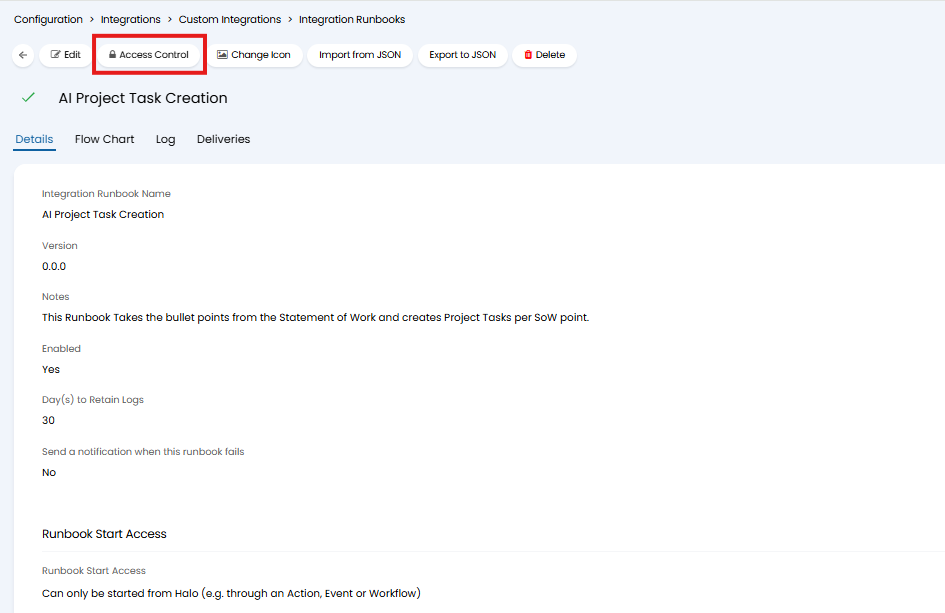
Fig 1. Access control button against a runbook
When selected you will be presented with the pop-up shown in figure 2. Here, you will need to choose the entity to give access based on, such as a role, department, agent. Then choose which role, agent, team or department should have access control to the runbook/webhook and the access level they have.
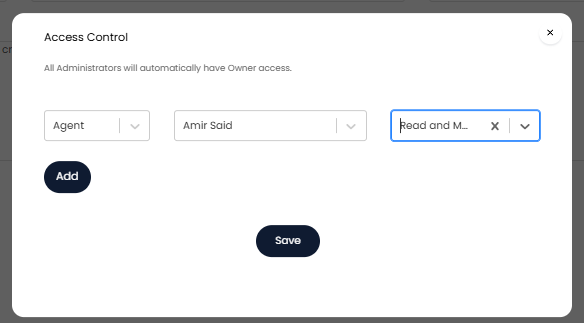
Fig 2. Setting access control example
In the figure 3 example only the agent 'Amir Said' will be able to read and modify this runbook.
Access control is given per runbook and webhook, so each time a runbook and webhook is created the owner will need to set which agent have access to the runbook/webhook.
Access level options:
None (Remove) - When chosen this will remove the access control the entity currently has.
Read and modify - Everyone within this entity will be able to view and edit the runbook/webhook.
Owner - Everyone within this entity will be able to view and edit the runbook/webhook. Owners will also be able to give access control to others.
When access control is given to an agent they will be able to access runbooks by navigating to configuration > integrations > webhooks > toggle between viewing webhooks and runbooks using the toggle in the top left of the page.
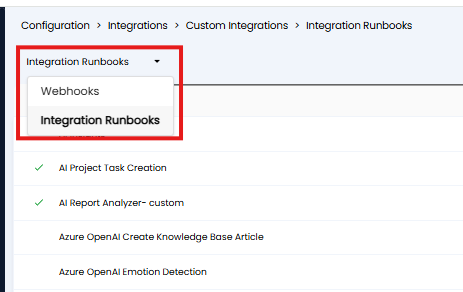
Fig 3. Toggle view between webhooks and runbooks