Customising Invoice lines for a Project
- group lines
- project labour
In this guide we will cover:
- How to customise how the labour lines for project work appear on the invoice, how they are grouped
In Configuration > Billing > Invoice Creation, there is a setting for 'Grouping for Invoice lines (Project)'.
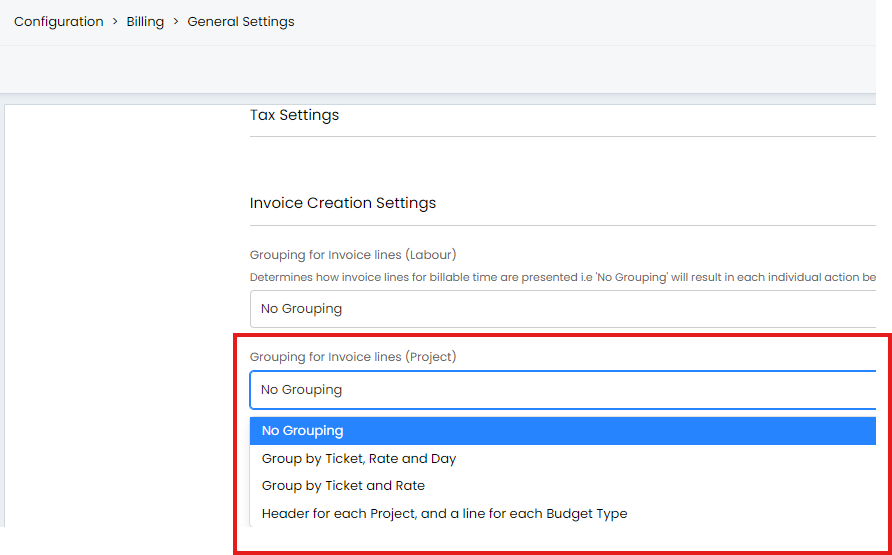
Fig 1. Project grouping settings
They will group the lines on the invoice as follows:
- No Grouping - There will be a line for every billable action on the project.
- Group by Ticket, Rate and Day - A line will show for each project ticket that has billable labour on, a line for each charge/budget rate within that ticket and a line for each day work took place.
- Group By ticket and rate - A line will show for each charge/budget rate, divided per ticket.
- Header for each Project, and a line for each Budget type - This is only used if you are creating one invoice for of a customer's projects. This will show a line for each budget/charge type per project. This will display under a header of the project summary.
When choosing a grouping it is important to keep in mind if your customers are invoiced per ticket, or if all labour for a customer is billed on the same invoice.
This is determined by the setting 'Invoice each Ticket separately' in Configuration > Billing > Invoice Creation (this setting is also found on the customer level).