GoTo Resolve Integration
In this guide we will cover:
- What is the GoTo Resolve Integration?
- Sending Invites with GoTo Resolve
- Ticket Updates/Closure
What is the GoTo Resolve Integration?
The GoTo Resolve integration allows you to create support sessions in GoTo Resolve and send invites to your users.
To use this integration, each agent needs to connect to GoTo Resolve. This can be done from their agent details page in the integrations tab. Once agents have connected to GoTo Resolve they can send remote session invites via several methods.
Sending Invites with GoTo Resolve
New Tickets
A remote session invite can be sent to the user when an agent logs a new ticket by including the "Send Remote Session Invitation" field on the new ticket form.
Actions
To send a remote session invite using an action you can create an action with system use "Remote Session Invitation". This will send an email to the user with an invite link. This uses the "Remote Support Invitation" email template.
Ticket Details
By enabling the Remote Support setting "Allow Agents to send quick Remote Session invites from the Ticket screen", you can send a remote session invite via the top right dropdown on the ticket details screen. This allows you to specify what emails to send the invite to.
Live Chat
When an agent is using the live chat to talk to a user, they can use the "Send GoTo Resolve Invitation" option from the top left menu to send a message with a link to the user. This will use the template specified in remote support settings.
Ticket Updates/Closure
GoTo Resolve will automatically update Halo with the chat messages of the session and will close the remote support session if Halo when completed in GoTo Resolve.
If a remote support session has been created from a ticket, a tab of sessions will be shown. You can filter the list to on the current completion status of the report sessions.
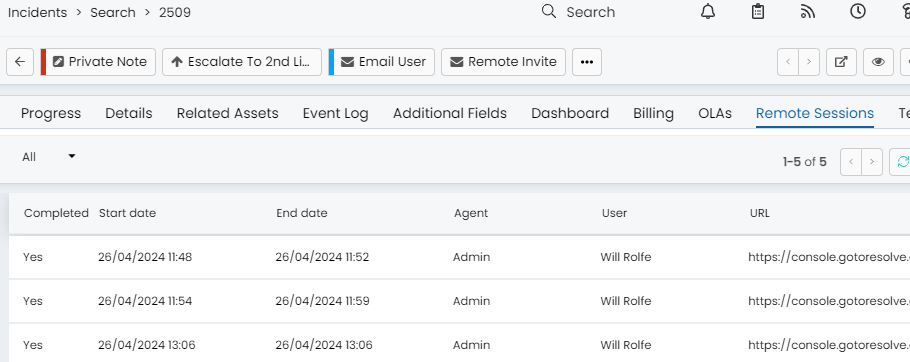
Fig 1. Remote Sessions tab.
You can view the details of the session, including a full transcript of the conversation between the agent and the user, as well as complete any outstanding sessions or download the recording of the session, if one is available.
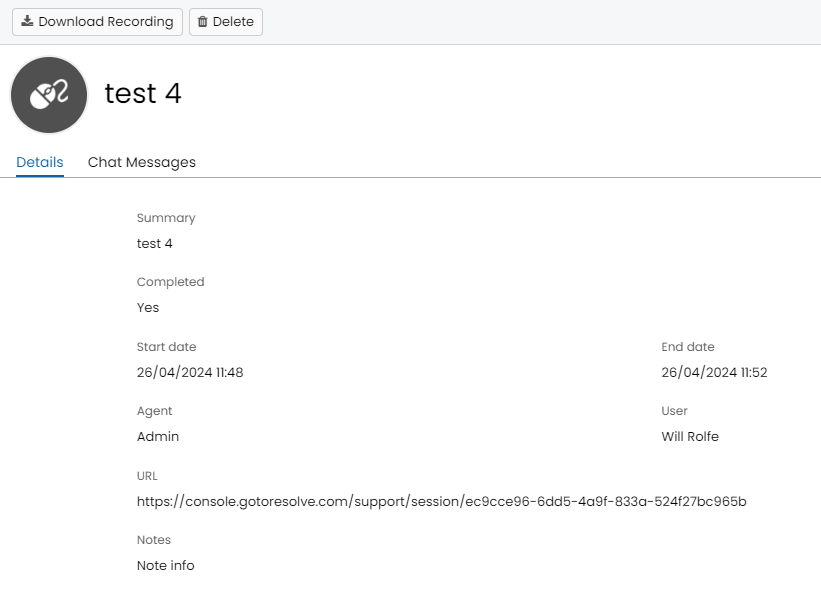
Fig 2. Summary and recording.
A daily scheduled task will check any outstanding remote sessions in Halo and close them if they have been completed in GoTo Resolve, but have previously failed to update Halo.