XSOAR Integration
- integration
- XSOAR
In this guide we will cover:
- What is the XSOAR Integration?
- Connecting XSOAR to Halo
- User Matching
What is the XSOAR Integration?
XSOAR can be integrated with Halo to allow for the creation of tickets in Halo from incidents in XSOAR.
Connecting XSOAR to Halo
The integration between Halo and XSOAR is configured mostly in XSOAR.
The attached Yaml files can be downloaded and used to import the configuration into your XSOAR instance.
Note: If viewing this guide on our website, please go to the support portal to download these files.
Once you've imported the configuration, you then need to add an instance of the HaloITSM integration and enter your Halo URL and the credentials for a Client ID and Secret application created in your Halo.
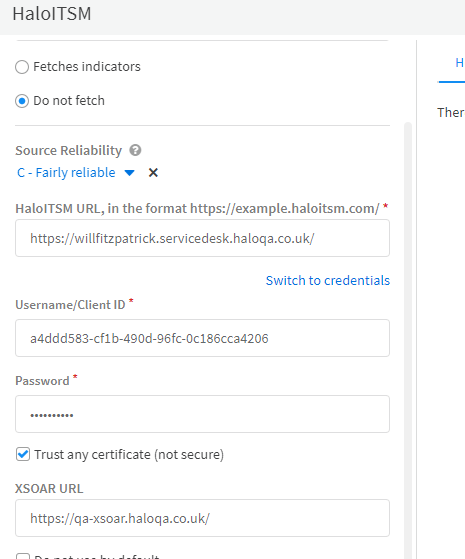
Fig 1. XSOAR configuration.
The imported playbook can be configured to map different fields for ticket creation. The incident ID field should not be changed, but all others can be updated to map the desired information. Additional fields can be added, but this will require adjusting the integration to handle them.
The format for the customfields input is the same as when updating customfields via the API e.g.
[{"id": 123, "value": "My customfield value"}]
The default user and ticket type can be specified in Halo
Currently, this integration can only be used to create tickets in Halo from XSOAR. However, this functionality will be expanded in the future to allow the synchronisation of updates between the incident in XSOAr and the ticket in Halo.
User Matching
If the username field is set during the create ticket command, it will attempt to match to a user in Halo using the username, email, and network login fields. If no user is found, the ticket will be logged under the default User.