Remove Your Company Details from the Self-Service Portal
In this guide we will cover:
- New Method (Recommended)
- Old Method (Deprecated as of v2.145)
By default your organisation details will appear in the footer of your self-service portal. These include your organisation address, phone number, email address and (as of v2.178+) website. All these organisation details are set under configuration > organisations. You can use the methods outlined in this guide to hide one or all of these details.
New Method
Use this method if you are on v2.145 or above.
Head to Configuration > Self Service Portal and scroll down to the section 'Footer content'. Here you will see the several checkboxes that will determine if each of your organisation details display on the portal. Simply check or uncheck a setting to change if the detail shows.
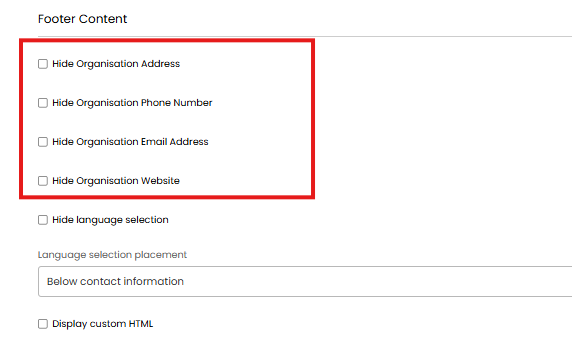 Fig 1. Hiding Organisation Details on the Self Service Portal
Old Method - Remove company details on the portal using Custom CSS
Use this method if you are on v2.145 or below
To achieve this, paste the CSS provided below, into the text box of the Custom CSS section you will find in Configuration > Self Service Portal:
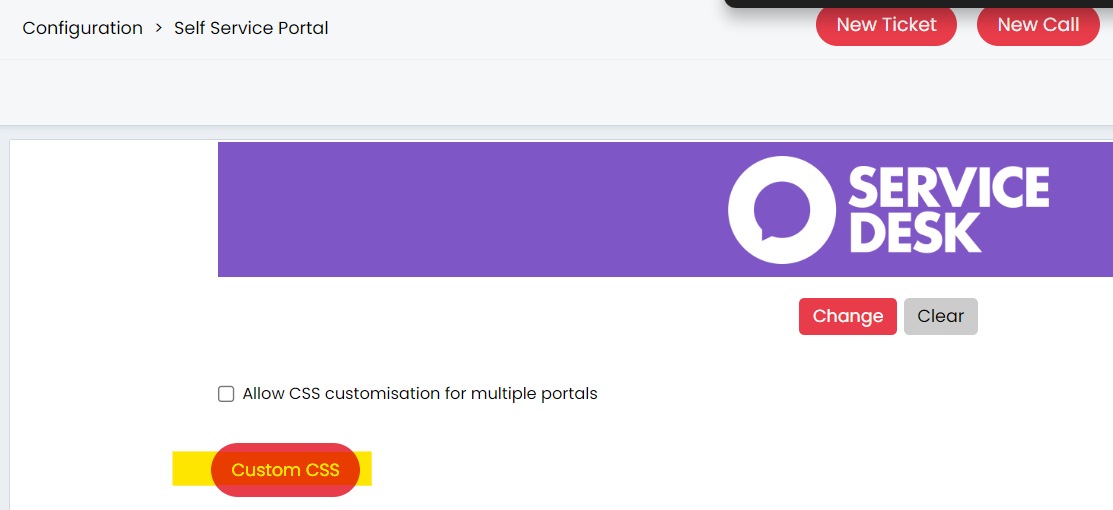
Fig 2. Customising the CSS on The Self Service Portal
There are two different styles given below:
- Completely removing the footer of the portal
- Keeping the footer but removing all the details
To completely remove the footer of the portal, the following CSS can be used:
.page-footer{
display:none !important;
}
Alternatively to the above CSS, keeping the footer looks like this below image:

Fig 3. The Footer of The Portal Without Company Details
This below CSS will remove all the details and keep the bottom section (footer) of the portal. Copy this CSS into the text box of the Custom CSS page:
@import url('https://fonts.googleapis.com/css2?family=Montserrat&display=swap')
.portal .search-title {
font-size: 2.5rem;
font-weight: 500;
font-family: 'Montserrat', sans-serif;
margin-bottom:40px;
}
.portal .dashbtn:hover {
background-color: rgb(0, 0, 0);
box-shadow: 0 20px 30px 0 rgba(36,50,66,.14);
}
.portal .page-title h1 {
font-family: 'Montserrat', sans-serif;
font-size: 1.5rem;
font-weight: 200;
}
.portal .details-form .details-group-header.title, .portal .page-title h1 {
font-family: 'Montserrat', sans-serif;
font-size: 1.5rem;
font-weight: 200;
}
h5 {
color: rgb(0, 0, 0);
font-family: 'Montserrat', sans-serif;
}
h5:hover {
color: rgb(255, 255, 255);
font-family: 'Montserrat', sans-serif;
}
.portal .searchbox, .portal .dashbtn, .details-group.card-panel {
border-radius: .75rem;
}
.details-group.card-panel {
box-shadow: 0 4px 8px 0 rgba(24,50,71,.1);
}
.ReactModalPortal, body .portal {
font-family: 'Montserrat', sans-serif;
}
.searchscreen .searchbox {
height: 60px;
}
.searchscreen .searchbox input[type=text] {
font-size: 16px !important;
}
#searchscreen-searchbar::placeholder {
color: rgb(127, 127, 127);
}
.react-kanban-column .card {
padding:30px !important;
}
.react-kanban-column .card h4 {
font-size: 1.3rem !important;
}
/*** highlight around searchbox ***/
.portal .searchbox:focus {
border: 2px solid #9ca6af;
color: rgb(200, 209, 221);
}
/*** portal service boxes - change background on hover ***/
.portal .dashbtn:hover {
background-color: #47d7ac;
color: #ffffff;
}
/***remove address box from portal***/
.portal .box1 {
display: none;
}
/*** image background repeat to remove white space ***/
div.main > div {
background-size: cover !important;
}